7 Python Deque Hacks for Lightning-Fast Sliding Windows and Queues
When processing real-time data streams or implementing sliding window algorithms, most Python developers instinctively reach for lists. But lists shift elements in O(n) time—a catastrophic bottleneck for high-volume applications. Enter collections.deque: a double-ended queue with O(1) appends and pops on both ends. In this article, we uncover seven powerful techniques that transform deque into your secret weapon for building performant sliding windows, thread-safe queues, and efficient data pipelines. Ready to stop shifting and start sliding? Let’s dive in.
1. Unlock O(1) Speed for Both Ends
Unlike Python lists, which append at the end in amortized O(1) but pop from the front in O(n), a deque delivers true O(1) operations on both ends. This is critical for sliding windows where you constantly add new data on the right and remove old data from the left. Behind the scenes, deque uses a doubly-linked list of fixed-size blocks, allowing the internal buffer to grow and shrink without massive memory reallocation. For a window of 100,000 elements, shifting a list would take thousands of microseconds per shift; with deque, it’s a microsecond. This small change alone can supercharge your data streaming applications.

2. Build a Thread-Safe Queue Without Locking Yourself
The queue.Queue class is the standard go-to for thread-safe operations, but it comes with overhead from internal locks. For many scenarios, especially producer-consumer patterns with a single producer and single consumer, deque’s built-in thread safety—when used with collections.deque and manual locking via threading.Lock—yields significantly lower latency. By wrapping a deque with a lock, you gain atomic append and pop operations without the heavyweight machinery of Queue. For high-frequency trading or real-time sensor data, this can mean the difference between capturing every tick and missing gaps.
3. Implement a Fast maxlen Sliding Window
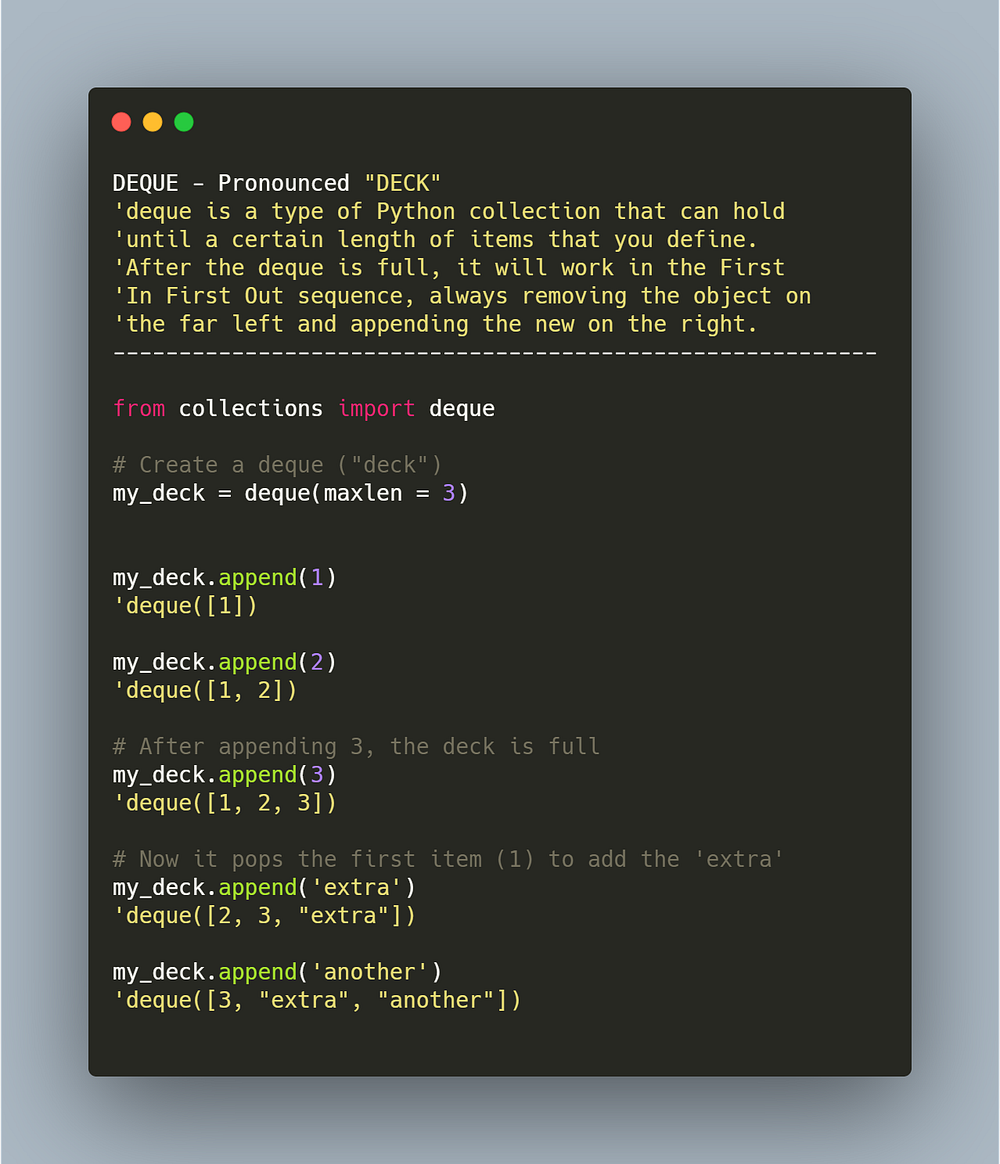
Deque offers a built-in maxlen parameter that automatically discards elements from the opposite side when the window reaches capacity. This is perfect for fixed-size sliding windows in streaming analytics, such as calculating moving averages, standard deviations, or rolling sums. No manual trimming or slicing needed—simply append, and the oldest element is evicted. Combined with itertools.islice or manual iteration, you can compute window statistics in O(1) amortized time per update, drastically outperforming list-based implementations that rebuild the window each step.
4. Rotate Elements Like a Programming Ninja
The rotate() method shifts all elements by a given number of steps in O(k) time, where k is the rotation distance. This is ideal for circular buffers, round-robin schedulers, or implementing cyclic sliding windows. For example, in a real-time data deduplication system, you can rotate the window to align timestamps or shift priority queues. While rotation isn’t as fast as O(1) access, it remains significantly faster than rebuilding a list from scratch. Use it sparingly but effectively when you need to re-center a window or reorder recent entries.
5. Optimize Memory with Efficient Element Removal
Removing specific elements from the middle of a list is O(n), but deque’s remove() method is also O(n) in the worst case—however, it traverses from the left and stops at the first match, making it more cache-friendly for small-to-medium deletions. Moreover, for frequent deletions from either end, deque excels because it avoids the memory shift that lists incur. In scenarios like garbage collection of expired tokens in a cache, deque with maxlen and occasional remove() can keep memory usage predictable while providing fast element eviction from the edges.
6. Seamlessly Integrate with itertools and Custom Converters
Deque works beautifully with Python’s itertools module. For instance, you can chain itertools.islice on a deque to sample a sliding window, or use itertools.tee for multiple consumers without copying data. Additionally, converting a deque to a list is O(n), but you can also use list(deque) for a snapshot. For custom data converters, subclass deque and override append or appendleft to apply transformations like normalization or thresholding—creating a “smart” sliding window that preprocesses data on the fly.
7. Avoid Common Pitfalls: No Random Access – Use Array for Indexing
Deque does not support O(1) random access; indexing an element at position i requires O(i) time because it must traverse from the nearest end. For applications requiring frequent index-based lookups (e.g., peak detection algorithms), complement deque with a separate array or use a list for read-heavy workloads. A hybrid approach—maintain a deque for fast sliding updates and a NumPy array for rolling statistics—leverages the best of both worlds. Also note that popleft() and pop() on an empty deque raise IndexError, so always check len(deque) before popping.
Conclusion
Python’s collections.deque is far more than a simple queue—it’s a versatile, high-performance tool designed for modern real-time data processing. From O(1) operations on both ends to built-in maxlen, rotation, and thread-safe patterns, deque empowers you to build sliding windows and producer-consumer pipelines that are both fast and memory-efficient. By understanding its strengths (edge operations, memory locality) and weaknesses (lack of random access), you can choose whether to use deque alone or in combination with other data structures. Stop shifting elements in lists—start sliding with deque, and watch your Python projects accelerate.